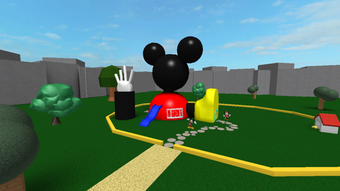

Explore Mickey Mouse Clubhouse on Roblox
Overview
The software, Mickey Mouse Clubhouse, is a free exploration game built within the Roblox platform, inspired by the popular Disney animated series of the same name. It offers a casual, family-friendly environment where players can navigate a themed island featuring iconic Disney characters and interactive elements such as slides and swings. The game is designed for entertainment and light engagement, particularly appealing to younger audiences and fans of the Mickey Mouse franchise.
While the core experience revolves around exploration and collecting coins, the game’s interactive depth is limited without additional players. The developer has included admin tools, allowing users to modify server settings via chat commands, which adds a layer of customization for those interested in managing gameplay dynamics. Real-world usage scenarios include solo exploration, family play sessions, or group activities where players compete to collect the most coins.
The game does not support complex narratives or structured objectives, making it best suited for relaxed, recreational use rather than intense gameplay. The developer did not provide additional system requirements beyond platform compatibility.
Key Features & Capabilities
- Themed Island Exploration – Players can freely roam a visually inspired island based on the Mickey Mouse Clubhouse series, featuring familiar environments and character statues. This provides a nostalgic experience for fans of the franchise.
- Coin Collection System – Throughout the island, players can find coins that accumulate in their account, serving as a basic in-game currency for purchases.
- In-Game Shop Access – Coins can be spent in a shop to acquire items such as weapons and decorative objects, though their utility appears minimal.
- Admin Tools Integration – A recent update introduced access to admin commands via chat, allowing users to modify server settings, such as kicking players or adjusting game parameters.
- Multiplayer Interaction – While the game functions solo, the experience becomes more engaging when friends join, enabling competitive coin collection and shared exploration.
These features support a low-pressure, social experience. For example, families can explore the island together, while younger players enjoy interacting with familiar characters. The shop and coin system encourage repeat visits, though the lack of meaningful rewards may reduce long-term engagement. The inclusion of admin tools suggests a degree of user control, though its practical value depends on the player’s interest in server management.
User Interface, Workflow & Performance
The user interface follows the standard Roblox layout, with intuitive navigation and a familiar dashboard for managing inventory, settings, and chat. Players can move freely using standard controls, and interactions with objects like rides and coins are straightforward. The workflow is linear: explore, collect coins, visit the shop, and repeat.
While the interface is accessible, the lack of visual feedback during interactions may lead to confusion. Performance observations are based on general software behavior patterns, as exact performance details were not specified. The game runs on the Roblox platform, which is known for stable operation across compatible systems.
The developer did not specify resource usage details, so CPU and RAM behavior remain unknown. Stability appears consistent with typical Roblox experiences, though the frequent pop-ups may disrupt gameplay flow. The game does not require advanced hardware, and installation size is minimal at 100 MB.
Compatibility & System Requirements
Mickey Mouse Clubhouse is available on both Windows and Mac operating systems, ensuring broad accessibility for desktop users. The software version is 1.0, with a file size of 100 MB, indicating a lightweight installation. Platform compatibility information is limited to the provided operating systems, and no additional details were shared regarding hardware specifications.
The developer did not specify exact system requirements, including minimum processor speed, RAM, or graphics capabilities. As a Roblox-based game, it likely leverages the platform’s built-in runtime, reducing the need for high-end hardware. However, users should ensure their system meets the general requirements of the Roblox platform to avoid performance issues.
No information was provided about updates or future compatibility plans.
Pros and Cons
Pros
- Free to play with no upfront cost
- Family-friendly, kid-appropriate content
- Accessible on both Windows and Mac
- Includes interactive rides and exploration elements
- Admin tools allow server customization for advanced users
Cons
- Frequent pop-ups promoting the VIP pass, disrupting gameplay
- Limited interactivity with characters and environment
- Minimal rewards for coin collection
- Dependence on multiplayer for full engagement
- Shop items appear to lack meaningful utility
FAQ Section
Is Mickey Mouse Clubhouse available on Windows and Mac?
Yes, the software is compatible with both Windows and Mac operating systems.
Can I play Mickey Mouse Clubhouse without an internet connection?
No, as a Roblox-based game, it requires an active internet connection to access the platform and server content.
Is the game safe for children?
Yes, the game is designed with family-friendly content and is suitable for younger audiences. However, parental supervision is recommended due to in-game advertisements and pop-ups.
Are there any updates planned for Mickey Mouse Clubhouse?
The developer has not provided information about future updates or development plans.
What is the purpose of the admin tools?
The admin tools allow users to access server commands via chat, enabling actions such as kicking players or adjusting game settings. This feature is intended for server management and customization.
Final Thoughts
Mickey Mouse Clubhouse on Roblox delivers a nostalgic, low-stakes experience for fans of the Disney series and younger players seeking casual entertainment. Its core strengths lie in its accessible design, familiar characters, and simple exploration mechanics. While the game lacks depth in gameplay and meaningful progression, it serves well as a light, social activity, especially when played with friends.
The inclusion of admin tools adds a unique touch for users interested in server control. However, the constant pop-ups promoting the VIP pass significantly detract from the experience, making it feel intrusive. For families or children looking for a free, themed environment to explore, this game offers a modest but enjoyable option.
If you're seeking a more dynamic or rewarding experience, alternatives may be more suitable. Still, for a quick, safe, and themed adventure, Mickey Mouse Clubhouse provides a simple yet familiar digital playground.
Download Mickey Mouse Clubhouse now







